Showing posts with label cool WEB. Show all posts

18 November 2012

Protect yourself from being hacked by hackers.!!

protect yourself from being hacked


Introduction

Smaller URL's or untrusted websites will seem to sometimes convenient and informative but we never know that they also hide the original address or some vulnerable script behind which install a malicious software while loading that website or URL and than you may be hacked. Today many peoples like us got trapped into this malicious link and there  all of valuable information reach into the hands of attacker that's the way they get hacked. So the most common question every internet user ask that what he can do for protection of my computeror to avoid hacking or avoid to get hacked. So here your answer lies within to protect yourself from being hacked.

To avoid such situation or illegal hacking many developer's came forward and created many websites ,tools,vulnerability scanners and plugins which can help you to avoid you getting hacked and avoid hacker letting your personal information into their hands.Many of such tools I have discussed below to save from hacking.

  1. Unshorten.it
unshorten.it

It is one of the good website to unshorten any URL. It also gives you an screenshot of the site which will be going to open so that you can easily trust on particular website and don't click on the malicious site blindly which might result in getting yourself hacked. It also gives a trustworthy rating according to our convenience so we can differentiate between which site is original or which is fake or used by hackers to do hacking.

                             It is available for Chrome and mozilla only in the market. Support for others browser will also be released soon.

To download for Mozilla you can goto this link.
To download for chrome you can goto this link.


    2. Longurl.org

longurl

An another good one URL longner which longens the URL so that you have idea that you are not clicking any site which result yourself to get hacked.. It also expands the shorten URL and gives the screenshot of it .

To download it for Mozilla goto this link.


3). WOT
There are also many variety of site checkers which help you to find out whether the site is trustworthy or not. One of these is WOT. It will help you providing useful rating and comment of many users to provide you a better choice to enter a particular website or not.
see website rating from web of trust


      You can goto this link  and download it. It is available for browsers like chrome, Mozilla. 


4)Swiftpreview.com

An another good plugin for Google users. It's easy and simple. just take your mouse over any link and it will give you the preview of it without opening it.

You can download it from this link to install swiftpreview to your chrome.

                This know URL is available for chrome users also. You can download it here.


There are many other sites which you can refer like:
  • Unshorten.com
  • Unshort.me
  • knowurl.com

6) Free Website Vulnerability Scanner and Tools
You have saved yourself from being getting hacked but what about if your website is being hacked. What will you do if somebody have access to your website, as it is the most common part in website hacking that attacker uses your admin passwords to access your website. The main question arises how the attacker got the password. Than we have many free online web auditing site which will help you to scan any website vulnerabilities for free and tell which way you can be attacked.

vulnerability scanner
click to enlarge

One of the best free web vulnerability scanner is Web Cruiser Web Vulnerability Scanner which is free to download. You can download it from link given here.

More will be added soon. Stay connected with us. 

7). Use Dropbox and other online cloud storage to store your important data.

Dropbox is an best online secure cloud storage operated by Dropbox Inc. Technology of Dropbox is totally depends on Cloud basis which includes file synchronization , and client software.It allows user to create a special folder on their computer which is synchronized on their cloud network.

If you store your data here and even if your computer is hacked and all data is deleted or attacker fill up your computer with viruses than it is better to keep your data safe and secure over the best and free online cloud storage to protect your data. 

Here hacking of dropbox is merely impossible because of encryption algorithm it used AES-256 one of worlds unbreakable encryption technique.

     There are many best alternative other than Dropbox like Google Drive, Box Sync are available with free of cost.You can see here how to install it. 

8).Encrypt your Data with best encryption software available in the market.

In any case you have been hacked, so now what about the data.So you'll want to make sure if your important data is safe or not.So with the help of True Crypt which is free and open source lets your data to be encrypted. It is of the best encryption software, I came acroo with which is available for your both Mac and Windows.
encrpt your data wih true crypt from getting protected from hackers
click to enlarge

Conclusion

Today spamming, hacking, phishing etc are very common nowadays. If user privacy is not protected than it will be very difficult to surf on the net. So to protect user privacy and avoid attacks we have these sites and plugins to help us out.

                 If you like our post than show your support by liking us on Facebook or follow us on Twitter. For any queries comment below anonymously. We are here to help you and your queries will be listened here.


Author-

07 November 2012

How to check the number of backlinks of your website from this awesome SEO Backlink checker tool ?

SEO backlink tool

Why am I writing this post?
Today I am writing this post because when I started my blog, I found an article in which they mentioned about the ways to increase your Google page rank and Alexa rank through backlinks.

They mentioned in their article that more the number of backlinks more is the Blog/ website’s traffic.
First, I want to familiarise you with the term Backlink.

What is Backlink?
Whenever you visit any blog/website, you find gadgets like Blog Roll, in which some links are given. Those links are called as Backlinks. You can also add backlinks in the comment space of the Blog/website, by posting a comment of your own, along with the link of the latest post in your Blog/website.

By an intense searching in the Google Search Engine, I found an awesome SEO Backlink checker tool which gives you the exact count of the number of backlinks for your Blog/website.

The tool’s name is Small SEO Backlink Checker Tool. The link of SEO Backlink checker tool is given below.
All you need to do is just enter the URL of your Blog/website in the given box of this SEO backlink checker tool and then click on check button.
SEO backlink checker tool search

In a fraction of seconds, you will not only get to know your backlinks count, but also about which backlink has good page rank, which can help you to tell about the quality backlinks.
SEO backlink checker tool search result

If you have any queries related to this post, then you may comment below….

Author-  

30 October 2012

Learn to distinguish between a fake and an original Email id


Very often, in the comments listed on our blog or websites, we can find many comments having negative feedback/remarks for our blog or website.

But, what’s interesting thing to know is that most of these comments are SPAM comments, i.e. they come from some unknown and fake email id. These are done by some anonymous people intended to cast a negative impression of our blog/website into other people’s mind.

So, how can we distinguish between a fake and a real email id?

It’s very simple. You don’t have to take any pain for it. Just visit the website my-addr 

image 98900809
Click to Enlarge
It is a website that checks for the existence of Emails from services like Yahoo, Gmail and Hotmail.

This website returns an unfeigned result in most of the cases, but it doesn’t return a result for Email services which do not allow reverse Email lookup.

After you open the website, click on “Verify Email for exist” located on the left side of the webpage. Next, enter the Email id whose existence you want to check. Then click on Go.

image 39399
Click to   enlarge
                                                  
The image shown below shows the existence of a true Email id.

image 23418
Click to Enlarge
                                   

However, if the email id doesn’t exist, it will show that the mail id is invalid(as shown in image below)
image 2321321
Click to Enlarge
                       
You can also use this website for many other purposes such as tracing email sender’s location, our IP information etc.

Explore this website more and make the best use of this useful website.

There are many other methods for email verification, but I have discussed only the best and the most widely used method.

If you have any queries related to this post, then you may comment below.. 


Author-

28 October 2012

Make your trips more memorable!!!


Image 213232

Refresh all your memories that you have cherished so far in your heart, by giving them an opportunity to re-live them.

Convert the collection of your photo clicks into an awesome video, and give your loved ones an incredible gift in the form of a video of those memories.

Rejuvenate these memories and make your trips lively again.

To convert your videos into memorable slideshows effortlessly, visit the website   Tripadvisor.
image575685
Click to Enlarge
The following are the main features of the website Tripadvisor:-

    1)    The main purpose of creation of any video is to depict the kind of theme it represents. For this reason, this website allows you to choose a variety of themes.
Depending on the type of trip that you undertook, the themes can be chosen accordingly (e.g. – Romantic , Family tour, Excursion, holiday etc.). Themes are available for all kinds of trips.
image7676
Click to Enlarge
    2)    The best part of it is that it allows you to choose your photos from a variety of sources such as Facebook, Twitter, Picasa and even from your own system.
image76575
Click to Enlarge
    3)    From the list of selected photos, we can also delete some photos if we don’t want them in our video. We can also re arrange the order of the photos as per our requirement.
image67575
Click to Enlarge
    4)    You can also give a name for your video that you will create from the photos, and also a give title for your slideshow.
    5)    You can also include the names of other people present in the pictures along with you.
    6)    You can choose background music from a list of music provided by them.
    7)    You can also choose music of your own choice and use it as the background music in that video.

image6757869879
Click to Enlarge

    8)    After we are done with all the adjustments related to the video, then there is also provision for previewing the video.
    9)    If after previewing the video, we are not satisfied, and we still want to make some changes, we can do that.
   10)                       After we have created the video, we can share that video on social networking sites like Facebook, Twitter, MySpace and even send it to some of our friends or relatives via E-mail.
          We can even embed this video on non-social networking sites such as Blogger, Tumbler, WordPress, Weebly etc.
imagr768768
Click to Enlarge
  11)                       We can also make it publicly visible if we want to, or we can skip it if we don’t want it.
  12)                       The best part of all is that the video that we have created can even be downloaded. We can thus watch it in future whenever we want.
image768688
Click to Enlarge
Thus, because of the presence of so many features, we must try out this website at least once.
We can make our loved ones very happy by this sweet, short and awesome slideshow.

If you have any queries related to this post, then you can comment below....

Author-  


27 October 2012

Create effortlessly an E-book of the posts from your Blog!!!

image 213123213

Many a times, it happens that we feel like seeing our Blog articles, but we don’t have Internet connection available at that time. What can we do not to put ourselves in such situations?

It may also happen that we wish to see all our articles at one place and we may also want to read the articles of our blog offline.

Here’s the simplest way for doing all these things. Depending upon our requirements, we can convert all/some of our blog articles into an E-book, with our name in it.
We can cherish that E-book lifetime, and it will be like an asset as well as a memory for us lifetime.

Follow these simple steps to convert your blog articles into an amazing E-book in no time:  -
1)    We can easily convert our blog articles into a valuable book.
This can be easily done by visiting the website blog2book.
2)    As soon as the website opens, an option called “Start now” will appear. Click it to proceed to the next step.
image 234234
click to enlarge

3)    Next, you will be asked to enter a blog address, i.e. the Blog from which you have will import the articles to get it converted into an E-book format.
It will also ask you to enter the platform on which your blog is based (e.g.  BlogSpot or WordPress).
4)    You will also be asked to fill the no of posts column, in which you can choose 10, 25, 50 or 100 articles in your blog. You can also select your posts by specifying the date range.

5)    After finishing all these, click on “Get the posts” to move to the next step.
image 232
click to enlarge

6)    Thus, all the selected posts will be fetched based on the specified dates or the number of posts.
7)    We can also remove some of the selected if we don’t want them. Once we are done with the selection of posts, Click on Continue.
8)    Next, it will also ask us to select a title, subtitle and Author name for the E-book.
image 324234
click to enlarge

9)    We can also choose a cover for our E-book. We can also add a preface  and dedication page for our E-book.
image 23424234
click to enlarge


image 12312312
click to enlarge

10)           After completing all these steps, click on “Create my book” .
11)           The E-book containing our posts will be created in a very short time.
12)           We can not only view that E-book online, but we can also download it, so that we can use it later.
image 21323213
click to enlarge

Thus, your awesome E-book is created in a very less time. You can read it offline whenever you want it, and also show it to your friends and family.

If you have any queries related to this post, you may comment below…

Author-  


22 October 2012

Learn with Google and be a Google Certified.

Today Google have spread all over the world and in every field. Like cloud computing, mobile computing and so on. Today Google has become number one in providing many services across the globe.

image353


Now Google has come up with many innovative ideas to teach internet users how to search there required queries in a very different manner so that they will get what they want.Now Google is started an campaign to educate the users to let them know how to search more efficient and in an effective manner.

So know Google has launched a new course as Power Searching with Google in which we all be learning how to do searching in an efficient way.

image433


                                                  Google will also provide you with the certificate on the basis of simple exam conducted at the last of the course.

image5e5
Now Google has closed this certified exam but soon it will be opened again. Before that you can learn and search effectively. You can have look to his course page here.

Google not only providing the course materials but also useful Webinars so that you have the maximum use of the google. Here you can look at those Webinars.

Author-   

18 October 2012

Exploring Gmail in depth


Gmail is not merely for sending and receiving  emails. It can also be explored far beyond these uses.

Here are a few amazing features in Gmail :-
1)   Lost your Gmail contacts ? Dont panic .Not an issue.
If we happen to accidentally delete some or all of our contacts in Gmail, then we don’t have to bother about it.
Gmail has a provision through which it backs up all our contacts from time-to-time.

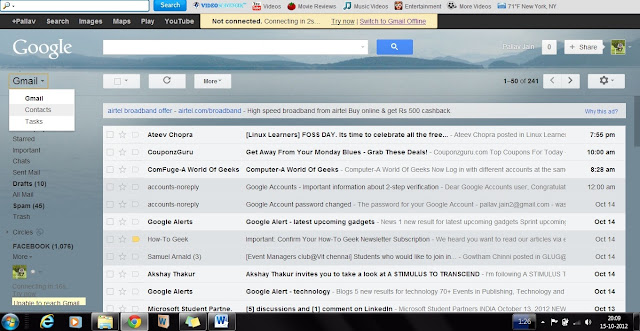
We just have to click Gmail, and then click “Contacts’’
So, even if we lose our contacts, we can get it back easily.


Next , click on ‘ More’ option and then click on ‘Restore Contacts’.
When we click that, Gmail gives us to get the back the contacts upto a time 10minutes, 1hour, 1 day or even 1week before. 
Select any 1 of these time and then click Restore. The contacts will then be restored upto the selected time.
2)  Images can be directly copied :
We need not click on ‘Attach files’ again and again to attach images.
Rather, we can “Drag and Drop” the file directly to the attach file area. After dragging the image, the image will be attached directly.
It will help save a lot of time. It will be especially useful for people who frequently keep sending images through Gmail.


3 )  Editing easily the text copied from somewhere to Gmail text space: -
If you copy some data from any sources (website or any word file etc.) into your compose mail text box, and then you waste a lot of time editing those text, then here’s the remedy for it. You don’t have to waste your time doing all that.
You can select the entire text, and click ‘Rich Formatting’ option just below the subject box. Then click on the button ‘Remove Formatting’ (Tx) button.
It will directly represent the entire text in the Gmail’s Standard Text format and thus save a lot of your precious time.


4)  Using it as a file saver & later using it for reading the files :-
This is probably a use of Gmail which none one of us apply. If we are into a habit of travelling very often, then we don’t have to carry our data with us all the time.
In this case, we can use Gmail as a back-up to store our files (be it in PDF format or in word, Powerpoint etc. doesn’t matter).
For saving file, we can compose a mail, attach the file in that and assign a Label for that file, and then save it in drafts. We can use a common Label for storing all our files at one place.


5) Become a Gmail freak by using Shortcuts :-
Gmail has this awesome feature wherein it allows the usage of a huge number of shortcuts.
All you have to do is to enable the keyboard shortcuts. This can be done just by changing the Gmail Settings. Click on  Settings. Then click on ‘Keyboard shortcuts on’ option. Then click on save changes to start using the Gmail shortcuts.


Some of the most useful Gmail shortcuts are:-
(<Shift> + c)  -  To compose a new mail.
                ‘J’   -  To scroll the messages down.
               ‘K’   -  To scroll the messages up.
               ‘#’   -  To delete a message.
(<Shift> + i)  -  To mark a message as Read and move to the next message.
(<Shift> + u)  -  To mark a message as Unread, so that we can read it later.
To know more about the shortcuts, You can click on Learn more option.(Shown above)

Author-  
Author-