Showing posts with label Android. Show all posts

22 February 2013

Instagram and Twitter Unfollow app for Android Users

JustUnfollow App Logo


In this decade, Twitter and Instagram prove that they are the two most intensely used Social media sites in the world nowadays. One is being used for micro-blogging and another one is being used for Picture sharing.

Every day, a normal user share several Pics, tweets, etc. related to his life, technology and current affairs in these social media platforms.

But everything is a waste, when nobody is following you.

So for that you follow many persons in twitter and Instagram daily and you believe that in front of that, some of them are going to follow you back.

But, the real problem arises when you follow 100 persons daily and only few of them are following back.

So, the real questions come in front of us are:-

How can you know those persons who are not following you back?
                                                       “OR”
Is there any Instagram and twitter Unfollow app present for Android Users to unfollow them?


Recommended article for you:-

So the answer of these two questions are yes because last Sunday, I found an Instagram and Twitter Unfollow App for Android Users “JustUnfollow” which can help you to unfollow those useless persons who are not following you back.

To install this app in your android mobile, you just have to click on this link (JustUnfollow- Instagramand Twitter Unfollow App for Android Users) and install it in your android mobiles like a normal app you install everyday and for PC you can use bluestack.

How to use Instagram and twitter Unfollow app for Android mobiles?

It is very easy to use this app in your android mobile, and because of that in the next section, I share two videos related to “how to add JustUnfollow on your android mobiles?”

For Instagram Unfollow App for Android:-


For Twitter Unfollow App for Android:-


And one more thing- don’t forget to follow our twitter, Facebook and Google plus page to get regular update on Social media topics and share your queries and suggestions related to this app by commenting below.


About the author

is a technical blogger who loves to write about games, tips and tricks,best useful software , android programming.If you like the author than you can find more interesting stuff by stay connected with him on Facebook , Twitter, Google plus and LinkedIn.
Gaurav Sharma -Author
 Facebook button             Google plus Button           Twitter Button              View Gaurav Sharma's profile on LinkedIn            StumbleUpon Button

15 January 2013

Send SMS text free from your computer using Bluestack


Send SMS text free through whatsapp in bluestack

Today due to popularity and excessive use of Internet, it lead many new things get evolved like sending a SMS text free from our mobile through an internet using various apps for it. As we know “necessity is the mother of all invention”.  So, apps like WhatsApp came to market to send SMS text free from our PC.

A popular message client which is available for every mobile OS like Blackberry, iOS, Android, Symbian, Belly to send SMS text free from computer. But they all are only for our mobile. Still we have no client for Windows PC officially released by Whatsapp Team. So, here I have a solution to send SMS text free from your computer just by installing whatsapp application using Bluestack software for windows.

BlueStacks -Split Installer Android Emulator:

Bluestack is a simple emulator which helps us to install WhatsApp and thousands other like applications because it help to run all android application on  your computer without using a mobile device because it has a whole android operating system on it.

You will not get the same extent of fun as much you get on your touch mobile, but for a whatsapp fan it is very good. Whatsapp is very fast and efficient method to send SMS text free from our computer.
Whatsapp Search box in bluestack

To begin just follow these simple steps to send SMS text free from your computer using whatsapp on Bluestack:-


  • First of all, you need to install Bluestack app player. So, download it from here BluestackSplit-Installer.
  • After download is finished, start installing it. And during installation, it will download its runtime data to help it run. So, I prefer you better have cup of coffee in this gap of time.
  • After installation just goto search box and search for whatsapp and install it on your Bluestack. You will get a get interface like that.

              WhatsApp Messenger Downloading

  • Select the store from which you want to download or install whatsapp because there are 4 stores available to provide you free whatsapp download.
  • Just click on continue to accept all terms and conditions. By the way, I think nobody read that. You just have to configure for how to send SMS text free from your computer.

      Enter contact Number in Whatsapp
  • Now complete the remaining steps as required. Just enter your contact number and country code to continue.
    SMS verication for whatsapp
  • Once you are done with that, you will get a whatsapp verification code which you have to enter there to complete the verification process. Thus, whatsapp will be fully activated on your windows PC and now you are ready to send SMS text free from your computer.
           send sms text free through whatsapp
  • So, it’s time for some action. Just create new contacts or use previous contacts to connect to all contacts you have. Here in the above image, I have shown how I have connected my brother’s phone using whatsapp on my windows PC. Now I can send SMS text free from my computer to my brother’s number.

So enjoy full power of your whatsapp. Send/receive message, videos, and music files.

Conclusion (Send SMS text free through bluestack):-


Bluestack is the best alternative I have ever seen. It has given a wide platform for various applications to use it without your Mobile device. One of it I have discussed in this post. I hope know you will be easily send SMS text free from your PC.

I hope you like my post. Any suggestion will be greatly appreciated. Comment boxes are always open for you.


About the author

is a technical blogger who loves to write about games, tips and tricks,best useful software , android programming.If you like the author than you can find more interesting stuff by stay connected with him on Facebook , Twitter, Google plus and LinkedIn.
Shubham Kedia -Author
 Facebook button            Google plus Button            Twitter Button            View Shubham Kedia's profile on LinkedIn

26 December 2012

mSpy – Best spy software for your mobile and tablet.

mSpy – Best spy software for your mobile and tablet.

With so many teens dreaming about a new tablet this Christmas, parents can’t help worrying about children’s internet usage.

Tablets give children a great opportunity to interact with their friends but they can also turn out to be extremely dangerous for their privacy.

During the holiday season, social media activities of children are on the rise and they are sharing more photos and videos on social networks. So meanwhile, they risk coming across online predators.

Parents need to tell children about the dangers of Internet but such talks won’t guarantee their safety. Monitoring teen’s tablet activities with tablet best spy software would be enough to ensure their online safety.

mSpy is an unrivalled tablet best spy software which keep tracks of children’s tablet activities and lets parents view all the logs later.

Thanks to best spy software-mSpy, parents can check the websites visited by their kids, find out their GPS location whenever there is a need, and read messages sent/received by them. Moreover, they can also block certain apps, restrict calls from predefined numbers and restrict access to inappropriate content.

mSpy will help you keep your children away from such hazards, making the Christmas holiday season peaceful and prosperous.

Discreet Monitoring

mSpy – Best spy software for your mobile and tablet.

mSpy is one of the best spy software, which runs silently in the background and doesn’t show any signs of its presence. It keeps the record of all actions by the tablet’s user and immediately transmits logs to your online control panel. You can check logs remotely from any Internet-enabled device.

Furthermore, mSpy tracks all websites visited and lets you see where the tablet was at any given moment. In addition, this software logs all contacts, calendar events, and enables you to view all photos snapped or downloaded.

How mSpy- Best spy software for your mobile and tablet works?

mSpy – Best spy software for your mobile and tablet.

MSpy is the cutting-edge tablet best spy software that is installed directly onto the tablet you want to track. Upon installation, MSpy starts silently recording the tablet activities, including web history, emails, GPS locations and more.

The great news is that you don’t need to get access to the tablet to view the logs because just like cell phone tracking software, MSpy sends the data to your online control panel where it is divided into different categories for convenience.

MSpy tablet best spy software includes all the features you need for keeping your child’s tablet usage in check. This application is easy to use and can be used for handling all your tablet monitoring needs.

I also wrote an article on (How to stop your kids from watching Adult Contents?) which helps you to protect your children from adult content.

If you have any queries related to this post, you can comment below.

This is a guest post by Kate pirs from Mspy-Best spy software. If you would like to write for ComFuge-A World of Geeks, check our guest posting guidelines.

Author-Kate Pirs
    About the Author
    This is a guest post by Kate pirs from Mspy and Search Engine Optimization by . For further information, please, visit- Mspy 


30 October 2012

Top 5 browsers for your android mobile which can boost up your internet experience.


As it seen nowadays people are becoming androphillic(android lover). Now every 1 out of 3 people having smartphones is of Android. Now smartphones are not merely for doing a phone call or receiving message its much more than that.

So what do you use to access the internet on them. Is it the default browser.If you also use the default browsers, then it's also OK. But don’t you want to enhance your experience.

If your answer is yes. Then this post is right for you on which i have tested many browsers according to their performance and speed.


1. Dolphin Browser


It is one of the best and fastest browsers available for the Android. Almost 10000K times it is downloaded from Google play store.


Features

  • Default and custom gestures to open up stuffs like Gmail.
  • It has lots of add-on's available for it..
  • The Sonar feature which enables you to search, bookmark, or share content, and even navigation using your voice.
  • Tabbed browsing is one of the must features available.

Current Available Version: 9.0.1


You can Install it from Here

Average site load speed: 8.36 seconds


2. Google Chrome


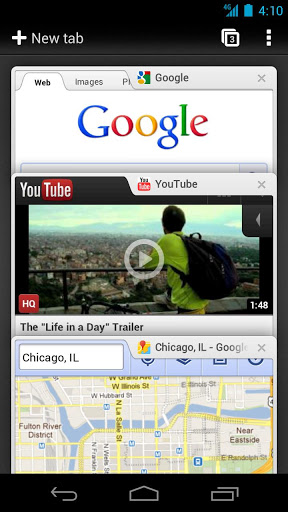
image 232432323
 image 34543543image 243234234


Chrome is no doubt the most used browser for PC’s as of now.\

 Features

  • Here are some of its features:
  • Incognito Mode browsing
  • Chrome Sync
  • Bookmark Sync
  • Tab syncing
  • Its fast
  • Clean and Minimalistic appearance

Current Available Version: Varies with the device

You can Install it from Here


Average site load speed: 6.9 seconds


3. Firefox

I think everybody knows Firefox for desktop and knows its performance.
But it will give you the same experience as it gives in your Desktop.


image 2324324
 image 34234234image 234234345


Features
  • It has available add-on's and Personas.
  • Firefox Sync
  • First Browser having Do Not Track
  • It almost features have all features of Desktop Version
  • Tabbed browsing, the must feature.


Current Available Version: 16.0.2

You can Install it from Here


Average site load speed: 10.1 seconds


4. Opera

If you're a fan of Opera on the desktop, than Opera Mobile will be best for you for your mobile.

image 23454656     image 435345345   image 23423424

Features
  • Speed Dials feature.
  • Sync Bookmarks and Speed dials
  • Best for slower and Limited Data Plans
  • Fast web surfing.
  • Tabbed browsing, the must feature.

Current Available Version:Varies with Device

You can Install it from Here

Average site load speed: 8.13 seconds

5. Skyfire

If you are very much addicted to the social networking site than this Browser is definitely for you.


image 234234234
 image 4546456345image 345435345

Features
  • Facebook Quick View & Like button
  • Fireplace Feed Reader
  • Twitter Integration
  • Fast web surfing.
  • Skyfire One Touch Search
  • Tabbed browsing, the must feature.
  • Sports,News & Finance Buttons
  • Flash Video
  • User Agent Switching

Current Available Version:4.1.0

You can Install it from Here


Average site load speed: 7.60 seconds

Conclusion: According to me the Best browser is Dolphin Browser which also comes in HD version for greater user experience. I have rate the Dolphin browser according to its features, speed, performance,memory usage, battery usage,features. I hope it will be easy for you to choose the correct Browser.

19 October 2012

A different Avatar of Samsung Galaxy S3 is going to be launched soon!!!!!

image 098
Click on the image to Enlarge
The Electronics giant Samsung is all set to yet again create its impact in the market of touchscreen mobiles.

The record breaking Samsung Galaxy S3 is coming back soon, but this time in its smaller Avatar – Samsung Galaxy S3 Mini’’.  As the name suggests, we can call it the younger brother of Galaxy S3. However, the word “Mini’’ attached to its name would not affect its features.


image 456
Click on the image to Enlarge


The expected date for the launch of Samsung Galaxy S3 Mini is first week of November. Even before its launch, it has created a great degree of enthusiasm in the market. The most exciting thing to watch out for is whether it would be able to compete with the other touchscreen mobiles .

Some of the features of  Samsung Galaxy S3 Mini are comparable to that of Samsung Galaxy S3,while some others are not so good in comparison to it.

The main features of Samsung Galaxy S3 Mini can be summarised as follows:-

1)      One of the areas where Samsung Galaxy S3Mini can outcast Samsung Galaxy S3 is in terms of the Price range. Its price will obviously be much less than Galaxy S3, so it has got a higher chances of picking up even a greater demand in very less time.

2)      The RAM size of Samsung Galaxy S3 Mini will be 1GB, which I believe might still be better than the RAM in any other phones in its price range.

3)      Another area, where it takes an edge on its ancestor is in the Operating System installed in them. While Mini will have latest Android OS 4.1(Jelly Bean), its ancestor had Sandwich OS.

4)      Samsung Galaxy S3 Mini will have an internal memory of 8/16 GB, and will be extendable up to 32GB.

5)      Samsung Galaxy S3 Mini supports 2G, 3G only. Unlike Galaxy S3, it doesn’t support 4G network. NFC technology and Wi-Fi will also be supported by it..

6)      It will have a 5MP auto Focus Camera with LED Flash, 720p video recording and VGA secondary camera.

7)      Its weight will be just 111grams. So, it will be easily portable anywhere. Hence, it might be preferred by those who don’t like large touchscreen mobiles.

8)      Its screen-size thou will be just 4-inches, but will have a screen resolution of 800 x 400 pixels.

9)       It will have 1GHz Dual-core processor.

10)   Its audio jack size will be 3.5mm ( same as the audio jack size in most other phones) .


Image 2341
Click on the Image to Enlarge


If you have any queries related to Samsung Galaxy S3 Mini, you may comment below...

Author-

13 October 2012

Android-Future Of Smartphones


img1


Before going to Tell what is an Android I Want to tell you what is an OS??
OS stands for Operating System which means an software to interface between hardware and software.For Ex Windows Xp ,Windows 7, Windows 8, Ubuntu , Fedora , Mint , Chromium , Debain , IOS , Symbian, Bada OS etc. There are more than hundreds of OS available in the market. Some of which are opensource and some of which are closed source.

Now you will be wondering what is an open-source and closed-source.
Let's than discuss here.
Open source is generally free to use, free to edit and  free to publish. If you have little bit of programming knowledge than you can also learn and modify it. They are published under general public license(GPL).
For example there are many open source OS available Like Ubuntu,Mint etc. all designed on Linux Kernel.

What is than Linux kernel?

Kernel is nothing but an application or software at the lowest level communicating with your hardware. It is also responsible for all the process running on the user mode also for whatever commands user is giving over the GUI(Graphical Interface User). Linux is nothing but an family of Unix type Operating System which is evolved in very earlier ages.
img2
click to enlarge

What is Android?

Android is an operating system based on Linux with a Java Programming interface, targeted at mobile hardware such as phones and tablet computers. Android is powerful tool which give an Enormous power to customize your own mobile in your own way.
Why Android?

Today Android powers hundreds of millions of mobile devices in more than 190 countries around the globe. It's the largest installed base of any mobile platform and its growing fast—every day another million users power up their Android devices for the first time and start looking for exciting apps, games, and other digital content. Android has now became the world's most popular mobile platform. With Android we can use all the Google apps we know and use, plus there are more than 600,000 apps and games available on Google Play to keep us entertained, alongside millions of songs and books, and thousands of movies.
img3
click to enlarge

What for you?

As Developer android provide you all the stuff you need like a compiler, debugger and a device emulator as well as its own Java Virtual machine.

img4
click to enlarge

Its Just A Beginning. Let see How Far I can reach.

Author :

06 September 2012

Have you ever tried running ANDROID applications on your PC? If not, then try using BLUESTACK App player.


Image 01

Many of the users, who don’t have an android based mobile phones, think that they might not be able to use modern applications like “Whatsapp” messenger. It is an application that has brought out a new revolution in the field of social networking. It has made connectivity much easier and people can stay connected with friends, relatives 24*7. All that it requires is just an internet connection and Whatsapp installed in your mobiles.

But this is not the reality. People who don’t have android based mobiles can use any android based applications even on their PC’s or laptops. It just needs a software named ‘BLUESTACK’ to be installed in PC. Bluestacks company is a SiliconValley based software company that produces BlueStacks App Player and BlueStacksCloud Connect. Both products help in running Android applications to run on Macintosh computers, Windows PCs and Windows tablets.

App Player is a downloadable piece of Windows software that comes pre-loaded with several apps including Bloomberg News, Words with Friends and Drag Racing, Facebook, twitter, pulse etc. More apps can be downloaded using the "Featured Apps" channel provided with the software. Cloud Connect is an Android App downloadable from the Android Market that allows additional apps to be pushed into BlueStacks App Player from any Android device. The products are now listed as beta software available for free download.

It works just as if an android operating system is installed in our pc, and all the applications will run in the same way as it would run in an android based mobile phone.

Image 02
click on the image to enlarge it

If you have any further queries related to bluestack , you can kindly comment below , and we will clear all your doubts.

Author-