12 February 2013

How to make money from Google AdSense effectively by adding ads below title?

Placing Ads under Title

Most people get very excited when they get the Google AdSense approval. They start dreaming of make money from Google AdSense. However, this excitement doesn’t last long, because their dreams get shattered, when they get very less income than their expectations. They start blaming Google for giving low revenues.

However, they are not aware that it is not Google who is responsible for generating low revenues. The people themselves are responsible for not knowing how to make money from Google AdSense.

The reason for low revenues is less number of clicks, and this happens because of wrong position of AdSense Ads in your blog. According to the picture below, the best position for your ads is Ads below title.
AdSense Placement


Recommended article for you


To add Ads below title, you should follow the simple steps given below:-

Step 1:-To make money from Google AdSense, first open your Google Adsense account to take the code of the Ads.

Step 2: - After this, open this link to change your code format so that it can work properly in your Blogger Template.

Step 3: - After changing the code format, go to your Blogger dashboard. Now, click on template and again click on “Edit HTML” option.

Step 4: - A Dialog Box appears on your screen. Click on “Expand Widget templates”present on the leftmost top position of the box.

Step 5: - Then find this code given below by pressing (Ctrl+F).

 <div class='post-body entry-content'>

Step 6: - When you get that code, to add Ads below title, place your Google AdSense code below the code given in step 5.

Note:If you want to stop showing your Ads on homepage, then you have to add the Ads in the format given below: -

<b:if cond='data:blog.pageType == &quot;item&quot;'>
Your Google Adsense converted Code
</b:if> 

Step 7:- After adding your Ads in the suitable place, click on “Save Template” button given on the rightmost bottom position on the dialog box.

You have successfully added Ads below title. Now, you can make money from Google AdSense effectively.


If you like my post on how to make money from Google AdSense by adding Ads below title, please do not forget to subscribe us.

I hope this post will help you a lot to make money from Google AdSense.

Also, if you get to know any other better method to make money from Google AdSense, then you should comment below, so that we can also learn to make money from Google AdSense.

Back to: ComFuge-A World of Geeks


Author: Pallav Jain
    About the Author
    Hello Friends,I am pursuing B.tech(Computer Science) degree from VIT University( Co-Founder of ComFuge-A World of Geeks). 

11 February 2013

Create your own Facebook faces


Hey guys this is one of favorite topics I had written earlier. We have many good and bad talks over Facebook  some of them touches our heart and make us feel good and some hurts a lot. So, Facebook faces is one of the best part of Facebook to show our emotions and expressions using that Facebook faces. Some of them I want to discuss with you and some more coming as you learn to create your own Facebook faces.

Here first I want to get introduced with the first simple list of some of the well-known Facebook faces just below all for you.
               
old facebook faces

Here are some newly added to this list as 

Simely

Name

Shortcut


Poop :poop:

[[iidislyk]]
Dislike[[iidislyk]]

Some codes are there to try it. I cannot show the images here. [[fingerrr]] , [[midfing]]
               Should try with care. Images may be shocking.
 If you have come up with more such emoticons feel free to comment on our post. We will definitely add your suggestion to our list


Now I think you are pretty well interested in how to make your own Facebook faces. So here are some of the steps you can do that. Here we go.

Step 1: Just select any image you want to make as Facebook face.
Step 2: Than just go to an app available on the Facebook apps.facebook.com/big-emo-creator/.
Step 3: Just click on “Click here to start”option shown on the page.
Step 4: Select the image form your disk and then upload in to the app.
Step 5: After processing the image it will generate some codes.
Step 6: Copy and paste the code generated in your chat box
Step 7: You will see the icon which will be generated from the image you have uploaded to the application.

Here I have some more interesting Facebook emoticons. Just copy and paste the amazing code into your chat box to get an customized Facebook faces. You can also send some of these icons to your loved ones because this is the season of love and valentine day is not far away.

[[283715395064836]] [[283715398398169]] [[283715391731503]] [[283715388398170]]
[[283715385064837]] [[283715478398161]] [[283715468398162]] [[283715475064828]]
[[283715471731495]] [[283715481731494]] [[283715551731487]] [[283715541731488]]
[[283715538398155]] [[283715548398154]] [[283715545064821]] [[283715628398146]]
[[283715631731479]] [[283715638398145]] [[283715635064812]] [[283715641731478]]


[[555243497850358]] [[555243467850361]] [[555243481183693]] [[555243474517027]] [[555243494517025]]
[[555243644517010]] [[555243661183675]] [[555243654517009]] [[555243664517008]] [[555243651183676]]
[[555243857850322]] [[555243854516989]] [[555243841183657]] [[555243847850323]] [[555243834516991]]
[[555243991183642]] [[555243987850309]] [[555243984516976]] [[555243997850308]] [[555243981183643]]
[[555244127850295]] [[555244124516962]] [[555244117850296]] [[555244121183629]] [[555244131183628]]


[[304965379609816]] [[304965376276483]] [[304965389609815]] [[304965386276482]] [[304965382943149]]
[[304965446276476]] [[304965459609808]] [[304965449609809]] [[304965452943142]] [[304965456276475]]
[[304965522943135]] [[304965536276467]] [[304965526276468]] [[304965529609801]] [[304965532943134]]
[[304965599609794]] [[304965596276461]] [[304965606276460]] [[304965602943127]] [[304965609609793]] [[304965672943120]] [[304965679609786]] [[304965686276452]] [[304965676276453]] [[304965682943119]]


[[370434879716448]] [[370434876383115]] [[370434889716447]] [[370434883049781]]
[[370434886383114]] [[370434979716438]] [[370434976383105]] [[370434983049771]]
[[370434986383104]] [[370434973049772]] [[370435059716430]] [[370435053049764]]
[[370435063049763]] [[370435056383097]] [[370435066383096]] [[370435153049754]]
[[370435143049755]] [[370435149716421]] [[370435139716422]] [[370435146383088]]


[[488850267812232]] [[488850257812233]] [[488850271145565]] [[488850261145566]] [[488850264478899]]
[[488850344478891]] [[488850331145559]] [[488850334478892]] [[488850337812225]] [[488850341145558]]
[[488850434478882]] [[488850424478883]] [[488850427812216]] [[488850421145550]] [[488850431145549]]
[[488850494478876]] [[488850497812209]] [[488850501145542]] [[488850504478875]] [[488850507812208]]
[[488850607812198]] [[488850611145531]] [[488850601145532]] [[488850604478865]] [[488850597812199]]


[[385500698222950]] [[385500701556283]] [[385500704889616]] [[385500708222949]] [[385500711556282]]
[[385500851556268]] [[385500864889600]] [[385500858222934]] [[385500854889601]] [[385500861556267]]
[[385501004889586]] [[385501018222918]] [[385501011556252]] [[385501008222919]] [[385501014889585]]
[[385501154889571]] [[385501151556238]] [[385501158222904]] [[385501144889572]] [[385501148222905]]
[[385501298222890]] [[385501284889558]] [[385501301556223]] [[385501288222891]] [[385501294889557]]


[[563672103675960]] [[563672090342628]] [[563672080342629]] [[563672100342627]] [[563672093675961]]
[[563672333675937]] [[563672327009271]] [[563672330342604]] [[563672323675938]] [[563672337009270]]
[[563672700342567]] [[563672713675899]] [[563672720342565]] [[563672687009235]] [[563672723675898]]
[[563672950342542]] [[563672957009208]] [[563672970342540]] [[563672937009210]] [[563672960342541]]
[[563673220342515]] [[563673193675851]] [[563673203675850]] [[563673210342516]] [[563673200342517]]


[[563038247072679]] [[563038267072677]] [[563038250406012]] [[563038260406011]] [[563038257072678]]
[[563038397072664]] [[563038400405997]] [[563038393739331]] [[563038403739330]] [[563038390405998]]
[[563038517072652]] [[563038513739319]] [[563038510405986]] [[563038523739318]] [[563038520405985]]
[[563038657072638]] [[563038647072639]] [[563038643739306]] [[563038650405972]] [[563038640405973]]
[[563038813739289]] [[563038810405956]] [[563038807072623]] [[563038803739290]] [[563038823739288]]


[[381902525249434]] [[381902528582767]] [[381902545249432]] [[381902531916100]] [[381902541916099]]
[[381902895249397]] [[381902871916066]] [[381902875249399]] [[381902888582731]] [[381902878582732]]
[[381903371916016]] [[381903351916018]] [[381903345249352]] [[381903365249350]] [[381903358582684]]
[[381903638582656]] [[381903648582655]] [[381903645249322]] [[381903651915988]] [[381903655249321]]
[[381903921915961]] [[381903928582627]] [[381903911915962]] [[381903918582628]] [[381903915249295]]
[[381904221915931]] [[381904211915932]] [[381904225249264]] [[381904215249265]] [[381904218582598]]


[[385500698222950]] [[385500701556283]] [[385500704889616]] [[385500708222949]] [[385500711556282]] [[385500851556268]] [[385500864889600]] [[385500858222934]] [[385500854889601]] [[385500861556267]] [[385501004889586]] [[385501018222918]] [[385501011556252]] [[385501008222919]] [[385501014889585]] [[385501154889571]] [[385501151556238]] [[385501158222904]] [[385501144889572]] [[385501148222905]] [[385501298222890]] [[385501284889558]] [[385501301556223]] [[385501288222891]] [[385501294889557]]
[[586701938029678]] [[]] [[586701928029679]] [[586701931363012]] [[586701944696344]] [[586702074696331]] [[586702088029663]] [[586702091362996]] [[586702084696330]] [[586702081362997]] [[586702294696309]] [[586702288029643]] [[586702281362977]] [[586702291362976]] [[586702284696310]] [[586702461362959]] [[586702471362958]] [[586702474696291]] [[586702468029625]] [[586702478029624]] [[586702828029589]] [[586702844696254]] [[586702838029588]] [[586702841362921]] [[586702831362922]]
Teddy Bear Holding Flower


These are some of the faces which will be made once you copy and paste that code into your chat box.

I hope you enjoyed this 
Facebook face creation. You have more waiting here.
      You can also make some more rather than just Facebook faces. You can also make some interesting art using some Facebook fonts available at these  famous site available.

  • Smileychatcodes : mo This is the best I have ever come acroos with. It has both feature like you can create your own facebook face and also chat with your friends with an custom fb fonts available on this site.
     This is what I got in Yahoo Style.Its amazing.
  • Funscrape

     This is an another snap of custom Facebook font chats.

    There are many other like this which i listed below. You will not get much of variety there but have some variations from the listed above. 
  • Technoclouds
  • Justnaira
  • Styliacfc

Conclusion

I have just concluded that Facebook faces are the best way to express someones feelings and emotions. I hope you will be now better at expressing emotions using the Facebook faces i have discussed above.

About the author

is a technical blogger who loves to write about games, tips and tricks,best useful software , android programming.If you like the author than you can find more interesting stuff by stay connected with him on Facebook , Twitter, Google plus and LinkedIn.
Shubham Kedia -Author
 Facebook button            Google plus Button           Twitter Button        View Shubham Kedia's profile on LinkedIn    StumbleUpon Button

03 February 2013

Top 4 tools to download free YouTube videos in an effective way.


YouTube Downloader


YouTube is a treasure of free YouTube videos -- from your favorite music videos to hilarious segments that keep you laughing, to some of your favorite movie scenes, all available just at one place. The problem is that you can't access these videos when you're not online. Even if you are connected to the Internet, there's always a chance that the user hosting the video will decide to take it down and you won't be able to find another copy.

If you want to continue enjoying your favorite videos online and offline, you can download free YouTube videos. Not sure how to do it? Here I discuss 5 awesome tools to download free YouTube videos in and effective way: -

Downloader Helper:

Download Helper Logo

Downloader Helper is one of the best options to download free YouTube videos because of its user-friendly interface for downloading any YouTube video. According to me, I always prefer this Mozilla Firefox add-on to download videos from YouTube. To install this tool in your PC, you should follow these simple steps given below:

First, open your Mozilla Firefox and after this, click on the given link (Download Helper) so that you can open the installation page of Download helper on your browser. You can find various options on menu-bar such as install, home etc. present on top of the installation page of download helper (Click on install option).

After clicking on Install option, a webpage appears on your screen with a variety of add-ons for your Mozilla Firefox browser, among which you can find a logo having three distinct colours balls. Just adjacent to that logo, there is an install button present to install Download Helper in your browser (Click on it).

A new tab opens with an option to add Download helper add-on in your browser (install it).

After completion of the installation of Download Helper, open YouTube and type your query in the YouTube search box. Select your YouTube video and wait for few seconds for video buffering. When buffering starts, then you can see three ball logo of Download Helper moving on the top of your browser (left hand side). On the right hand side of that logo, you can find an arrow pointing down (click on it). When you click on the arrow, then a drop down menu appears on your screen with various formats of those free YouTube videos. Choose your format and download your free YouTube videos.

Keepvid

KeepVid Logo

If you want to download free YouTube videos in a Geeky manner, then I think you should use keepvid.

According to me, if download helper fails to download any video in good format, then this tool always works because it offers you a wide variety of quality choices for the video that you want. You can download any quality of free YouTube videos that you want to.

It also makes your video in mp3 version, so that if you want to get an audio of any free YouTube videos in very less size, you can do it easily with this awesome tool.

To download video from keepvid, first make sure that Java is pre-installed in your PC? After checking java on your PC, search your YouTube video, so that you can fetch its URL to download your free YouTube Videos easily in various formats.

After fetching the URL of your video, go to Keepvid and paste the URL of your video on the box of keepvid and click on “DOWNLOAD” button (right hand side). After this, a dialog box appears on your screen for asking you to run your java. After clicking on “RUN” button, a list of various formats of your video appears on your screen, choose the desired option and click it to download your free YouTube videos.


YTD Video Downloader

YTD Video Downloader Logo

YTD video Downloader is a free YouTube videos program, which is available for any type of video format and browser. To download this software, click on this link (YTD video Downloader)

The next step is to go to YouTube and to copy the video URL. You can find this under the "Share" options below the video.

Highlight the URL and enter CTRL+C to copy the link. You can also right click on your mouse and choose "Copy."

When you switch to the YTD video downloader, the URL should automatically be pasted into the box labelled "Enter the URL of the video you want to download." If it's not, enter it.

You can choose the download quality and the destination folder for your download in the drop down menus under the URL box.

Click the red button in the lower right-hand corner labelled "download."

Depending on the speed of your connection and the size of your free YouTube videos, it will take anywhere from a few seconds to a few minutes for your download to finish. You should see a status bar and an estimated time while the video downloads:

The status bar will show completed when the download is finished, and your video will appear in the folder you selected when you started the download.

Easy YouTube Video Downloader:

Easy YouTube Video Downloader Screenshot


Easy YouTube Video Downloader is the same as Download Helper. I will advise you to use Easy YouTube Video Downloader. If Download helper is not working properly in your PC, then it is the best alternative to download free YouTube videos.

To download free YouTube videos from Easy YouTube Video Downloader, you just have to follow these simple steps given below.

First, open your Mozilla Firefox and after this, click on the given link (Easy YouTube Video Downloader) to add this add-on in your browser.

After adding Easy YouTube Video Downloader in your Firefox browser, open YouTube and type your query in the YouTube search box. Select your YouTube video and wait for few seconds for video buffering.

Click on “Download” button present just below your YouTube video. Then, a drop-down menu opens with various formats of that YouTube video.

Select your desired option and save free YouTube Videos in your PC.


Have you used any other programs to download free YouTube Videos? Share your favourite’s free YouTube Videos downloader in the comments!


This is a guest post by Sarah Clare (Project Management Software) on free YouTube Videos. If you would like to write for ComFuge-a World ofGeeks , check out our   guest postingguidelines .


Author: Gaurav Sharma
    About the Author


25 January 2013

Learn How to make your own Facebook emoticons


make your own lovely facebook emoticons


What is an emoticons and what fun making in it.


As we all know Emoticons, conjointly called emoticon faces, add interest and temperament to otherwise plain text by animating your thoughts with easy-to-see feeling. Messages and notes on Facebook are a lot of attention-grabbing with emoticon faces. Emoticons will categorical happiness, amusement, anger, sadness, shock, mischievousness and even tears. Brighten up your thoughts and communicate feeling with a couple of keystrokes it interact readers with emoticon faces, frowns or perhaps a rolled hair. It's fast and straightforward to try to.

In this post I want to show you how to make your own Facebook   emoticons. It is easy to make your own Facebook emoticons.


Here I want to discuss about a simple website named smileyti.me. A best site to make your own Facebook emoticons.

    Step 1: Just go to this site smileyti.me or smileychatcodes.com
    Step 2: It give a variety of chat fonts and help to upload your own custom 
     image to your chat box.
   Step 3: Just follow steps to make your own Facebook emoticons.
   Step 4:You will see something like this 

fonts for facebook chats

   Want to make a bigger Facebook emoticons than there is one more app.

  There is an one more app on Facebook which also help you to make your  own 
Facebook emoticons even bigger.
make your own facebook emoticon- big emo creator

Step 2: It will create a bigger emoticons than the previous one which I have discussed.
Step 3: Now your own Facebook emoticons are ready to be used in your chat box.

This is one of the Snap of how i make my own emoticon created by this app.
facebook emoticon of my photo in facebook


Conclusion


I think there is nothing to conclude about make your own Facebook emoticons. It for those who want to make their chat little bit more interesting and funny. If you like the post please feel free to comment. It will help me to improve better.

About the author

is a technical blogger who loves to write about games, tips and tricks,best useful software , android programming.If you like the author than you can find more interesting stuff by stay connected with him on Facebook , Twitter, Google plus and LinkedIn.
Shubham Kedia -Author
 Facebook button            Google plus Button           Twitter Button        View Shubham Kedia's profile on LinkedIn    StumbleUpon Button

22 January 2013

How to improve your Google search Skills?

Google Search Skills

Imagine what your life would be like if Google stops providing its search engine services even for a single day! It is hard to imagine. Isn't it?

It is really very difficult today to imagine life today without the Google search engine. It is possible to stay without food for a day or more, but certainly without Google. Just kidding!

Almost everyone today uses Google for some purpose or the other. Google has made the lives of people very simple and easy going. All the information needed is available just at one place.

People use Google by just typing whatever they want to search, but they never think that their search results can be reduced significantly, if they learn a few simple tricks. So, it is very important to improve your Google search skills.

They must realize how important it is to improve your Google search and must bring it to practice daily, to make their lives simpler and start using Google like an expert.

Following are a few Google search tricks that can help you improve your Google search skills and save a lot of time by putting in minimum efforts: -

Mathematics and conversions:

If you are not able to solve any equation, or if you are lazy enough to do it on our own, you don’t even need to open up a calculator to solve it.

You can simply type any maths problem on Google and it will return us the solution to our problem in a few seconds. Google itself will act as a calculator.
Google Calculator

It can also do the conversions from one unit to the other by just typing what unit is to be converted to what.
For example -  $ 1000 in rupees. 
Google Conversion Search

Use “define:” before any word whose meaning you want to know:

We can save lot of time in looking up for the meaning of a word in different websites by using define followed by a colon and then the word.

For example – define photosynthesis.

Google will give you a definition/meaning of that word at the top of the results and you don’t even need to open any website to see it. Thus, it saves lot of time and helps improve your Google search skills.
Google Dictionary

Searching for Nearest Adventures Places:

In order to search for places of adventure nearest to your home, you don’t need to search much.

By entering "movies" before a ZIP Code or a city name will produce a list of films playing nearby. This is the easiest and the best way to search for a refreshing place nearby. Thus, improve your Google search skills and make your life simpler.

Example – movies 781008
Searching for Nearest Adventures Places

Website search:

If you want to search for any content on only a particular website, then you can narrow down your search to a single website, by using site: followed by a Web address.
For example – by typing site:comfuge.org in your search, you will get results only from the ComFuge-A World of Geeks website.
Power Search site:comfuge.org

An extension to this is to get results only from sites belonging to a particular domain.  You just need to type Site: followed by domain type and it will give you results belonging only to that domain. Thus, it saves lot of time and helps improve your Google search skills.

For example – if we want to get only sites belonging to Edu domain, just type site:edu to your search.

Searching by using suitable prefixes to improve your Google search skills:

This is also very useful method if we want to search for books, articles of a particular author, or if we want only a particular kind of file in our search results.

The two can also be combined to make the search even simpler. It is the best approach for searching technical documents or research papers.

Thus, it significantly helps improve your Google search skills
Example
File type: PDF will only show you specific file type pages such as PDF.

Author: Silberschatz will only bring up pages and documents authored by Silberschatz.
Author Search in Google


Related sites: used for searching sites related to a particular website.
For example - related:www.google.com can be used to find sites similar to Google.
Related search in Google

Use minus (-) to limit the search:

It’s one of the best ways to reduce the number of pages returned.
Using words within quotation marks will reduce the number of searches by removing all the irrelevant searches. Thus, it helps improve your Google search skills.

Example -“alternatives for Google Drive on Linux” will return you only the articles in which the words are in exact order as written within quotes.


Use words within quotes

It’s one of the best ways to reduce the number of pages returned.

Using words within quotation marks will reduce the number of searches by removing all the irrelevant searches. Thus, it helps improve your Google search skills.

Example -alternatives for Google Drive on Linux” will return you only the articles in which the words are in exact order as written within quotes.

Use word within Quotes Search


The OR operator (|):

We use this operator to return results with either of the two terms.
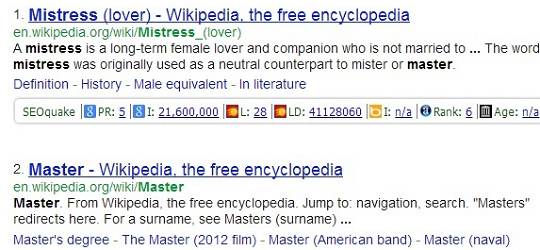
For example– Master|mistress will return pages with both master and mistress, while master|mistresswill return pages with either master or mistress.
The OR operator (|) Search

Numeric ranges: 

You can refine your searches by using numeric terms by returning a specific range, but you must provide the unit of measurement. Example - Blur – a new alternative for NFS 2011..2013 will return searches related to blur published between 2011 – 2013. Thus, it saves lot of time and helps improve your Google search skills.
Numeric ranges Search

IPhone $700 $800 will return IPhones in the range of $700-$800.

The tide operator (~):

By including the symbol ~ infront of a word or phrase, we also include synonyms of that word/phrase in our search results. However, it does not work always.

Example - A search for ~refurbish includes the synonym also and returns related pages to refurbishment.
The tide operator (~) Search

Conclusion:

Thus, if you want to make your life simple, you should improve your Google search skills.

If you like my post on How to improve your Google search skills, please don’t forget to subscribe and follow us.

I hope this post will help you a lot to improve your Google search skills.
Also, if you get to know any new Google search tricks, then you should comment below, so that we can also learn from you.

If you have any queries related to this post which is on How to improve your Google search skills, feel free to ask us by commenting below.

Author: Pallav Jain
    About the Author